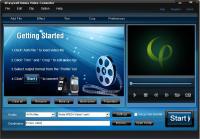
4Easysoft Nokia Video Converter provides perfect solution to convert your favorite video files to Nokia mobile phone format with the best quality of picture and sound. This Multimedia Converter software could support almost all source formats.
4Easysoft Nokia Video Converter provides perfect solution to convert your favorite video files to Nokia mobile phone format with the best quality of picture and sound. This Multimedia Converter software could support almost all source formats, including WMV, MPEG, MPG, ASF, MOD, FLV, SWF, RM and HD files, etc.
In addition, 4Eaysoft Nokia Video Converter also has many advanced function and rich settings for video output. So this powerful Nokia Video Converter doubles your enjoyment of watching videos on Nokia phone. This Video to Nokia Converter Software is so easy-to-use that whether you are an experienced user or a beginner, converting all popular video formats to Nokia video is just in a breeze.
Key features:
1.Adjust video effect
Adjust video Brightness, Contrast, Saturation and audio Volume. Avoid mosaic by checking Deinterlacing.
2.Split video
Trim any segment of your video to Nokia video by setting the Start time and End Time or dragging the slider bar.
3.Merge video
This Nokia Multimedia Converter doubles your enjoyment with joining several interesting clips into one.
4.Crop video
Crop off the black edges of video. Adjust the screen aspect ratio: keep original/ full screen/16:9/4:3.
5.Capture pictures
If you like the current image of the video, you just click the "Snapshot" button. The image will be saved , then you can transfer it to your Nokia phone.
6.Real-time preview
Preview both the source video and converted video simultaneously while editing to get the best movie effects.
7.Customize output settings
Set the Video Encoder, Resolution, Frame Rate, Video Bitrate. You can directly input your own resolutio; set the Audio Encoder, Sample Rate, Channels, Audio Bitrate. You also can save all the output settings as your preference, which is saved in the user-defined column automatically. Whats new in version 3.2.26: 1.Add image or text watermark with customized transparence, position. 2.Select a variety of output formats simultaneously from source file. 3.Select both subtitle and audio track for your output video. Requirements: 800MHz Intel or AMD CPU, or above; 512MB RAM or more Operating system: Win2000,Win7 x32,Win7 x64,WinOther,WinVista,WinVista x64,WinXP,Other Release notes: Major Update
ImTOO 3GP Video Converter v3.1 is a professional mobile phone tool. It supports converting
various popular formats including RM, RA, 3GP, 3G2, WAV, MP3, AAC, WMA, MPG, M4A, AVI,
MP4, MOV, WMV, MPEG, CUE, APE, CDA and AVI to 3GP,RA, RM,AAC, M4A,XviD.
Price: $25.46, Rating: 8.2, Downloads: 107 Download
Total Audio Converter is the best tool to convert mp3, wav, flac, ogg, ape and much more. Look closer at it: TAC supports all audio formats, has built-in CD ripper and audio player, can be handled via command line and is still very user-friendly.
Price: $17.91, Rating: 6, Downloads: 100 Download
Reezaa WMA Converter is an easy-to-use all to WMA converter Converts all formats Video and Audio to WMA,WAV,MP3,OGG,FLAC,AMR,AC3,AAC.It supports MP3, AVI, WMV, MOV, 3GP, MP4, FLV, RM, RMVB, VOB, DAT, MPEG, WAV, WMA, ASF, OGG, RA etc.
Price: $29.95, Rating: 0, Downloads: 93 Download
Jesterware DVD Audio Ripper is a powerful DVD Audio ripping program, which will take your DVD and convert the audio track into an audio formats of your choice.
Price: $24.99, Rating: 6, Downloads: 69 Download
User Rating
Rating:2.2 out of
5 Based on13 ratings.
13 user reviews.

 4Easysoft Nokia Video Converter 3.2.26 details